- Install Pycharm in Ubunto 20.04 LTS.
sudo snap install pycharm-community –classic
2. Install vncserver
   sudo apt update

   sudo  apt install sc xfce4 xfce4-goodies

   sudo apt install tightvncserver
3. Configure vncserver
vncserver -kill :1
mv ~/.vnc/xstartup ~/.vnc/xstartup.bak
nano ~/.vnc/xstartup

Add the following lines to xstartup
#!/bin/bash
xrdb $HOME/.Xresources
startxfce4 &
chmod +x ~/.vnc/xstartupStart vncserver
vncserverOn another computer that is running VNCviewer, enter IP:5901 where IP is the IP address of the Ubuntu computer. If there are display issues ,
touch ~/.Xauthority
sudo chown $USER:$USER ~/.Xauthority
Install pyuic . Python3.12 is already installed in Ubuntu. For some reason when installing the package in PyCharm with a virtual environment it fails to install pyqt5-tools. The one below works.
sudo apt install pyqt5-dev-toolsTo generate a python file for the ui created in QTDesigned
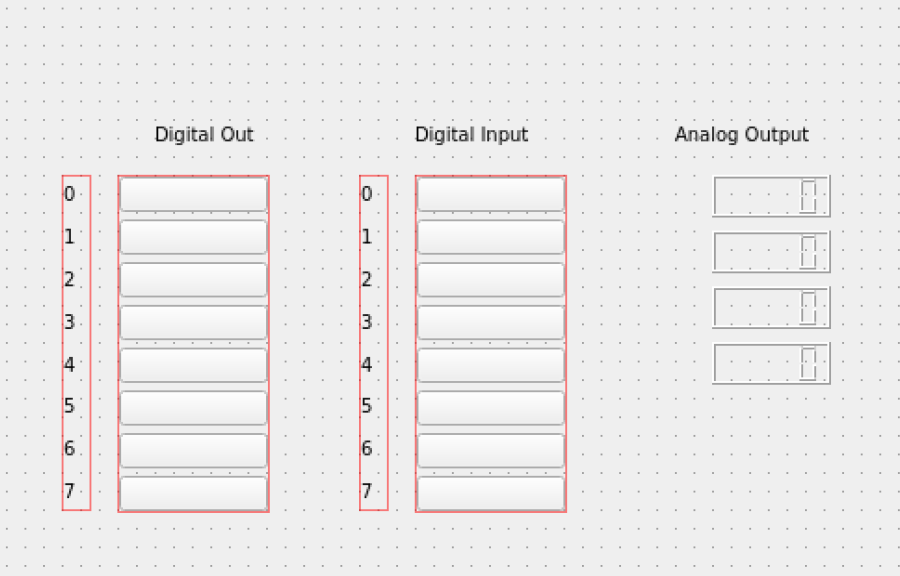
pyuic5 untitled.ui -o test.py Generated test.py. Note that the test.py file should not be modified. Instead the ui file should be changed and then the above command is run again. Part of code for test.py
# -*- coding: utf-8 -*-

# Form implementation generated from reading ui file 'untitled.ui'
#
# Created by: PyQt5 UI code generator 5.14.1
#
# WARNING! All changes made in this file will be lost!


from PyQt5 import QtCore, QtGui, QtWidgets


class Ui_MainWindow(object):
    def setupUi(self, MainWindow):
        MainWindow.setObjectName("MainWindow")
        MainWindow.resize(800, 600)
        self.centralwidget = QtWidgets.QWidget(MainWindow)
        self.centralwidget.setObjectName("centralwidget")
        self.label = QtWidgets.QLabel(self.centralwidget)
        self.label.setGeometry(QtCore.QRect(100, 90, 121, 16))
        self.label.setObjectName("label")
        self.AOut0 = QtWidgets.QLCDNumber(self.centralwidget)
        self.AOut0.setGeometry(QtCore.QRect(400, 120, 64, 23))
        self.AOut0.setObjectName("AOut0")
        self.label_10 = QtWidgets.QLabel(self.centralwidget)
        self.label_10.setGeometry(QtCore.QRect(240, 90, 121, 16))
        self.label_10.setObjectName("label_10")
        self.layoutWidget = QtWidgets.QWidget(self.centralwidget)
        self.layoutWidget.setGeometry(QtCore.QRect(210, 120, 16, 181))
        self.layoutWidget.setObjectName("layoutWidget")
        self.verticalLayout_3 = QtWidgets.QVBoxLayout(self.layoutWidget)
        self.verticalLayout_3.setContentsMargins(0, 0, 0, 0)
        self.verticalLayout_3.setObjectName("verticalLayout_3")
        self.label_11 = QtWidgets.QLabel(self.layoutWidget)
        self.label_11.setObjectName("label_11")
        self.verticalLayout_3.addWidget(self.label_11)
        self.label_12 = QtWidgets.QLabel(self.layoutWidget)
        self.label_12.setObjectName("label_12")
        self.verticalLayout_3.addWidget(self.label_12)
        self.label_13 = QtWidgets.QLabel(self.layoutWidget)
        self.label_13.setObjectName("label_13")
        self.verticalLayout_3.addWidget(self.label_13)
        self.label_14 = QtWidgets.QLabel(self.layoutWidget)
To use the form in your python file import the class
from test import UI_MainWindow
Sample code display.py
import sys
from test import Ui_MainWindow
from PyQt5.QtWidgets import QMainWindow,QApplication, QWidget,QPushButton,QLCDNumber


class Setup(QMainWindow,Ui_MainWindow): # inherit from the base class and the Ui_MainWindow so that ui elements are available

 def __init__(self,parent=None): #parent=None means a top level window
        super().__init__(parent) # calls the constructor of the parent classes
                                 # for proper initialization
        self.setupUi(self)


if __name__ == '__main__':
    app = QApplication(sys.argv)
    window = Setup()
    window.show()
    sys.exit(app.exec())
~
Note: In PyCharm, if pyqt5-tools is enabled, just open a terminal ( bottom left) and type pyuic5 file.ui -o test.py to generate the python file.